Catalog Backup Option
Your Catalog contains copies of all your metadata, processing settings, framing and many other items of information. If the catalog is lost than most of this information is also lost. Your Raw files are separate from the catalog and are unaffected by this. Note, they are not backed up by this process.
Setting the Backup option
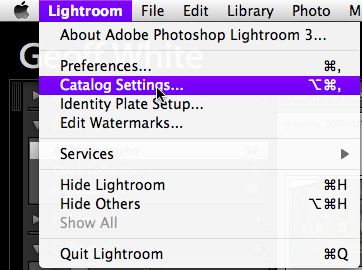
Go Lightroom > Catalog Settings ...
Backup settings
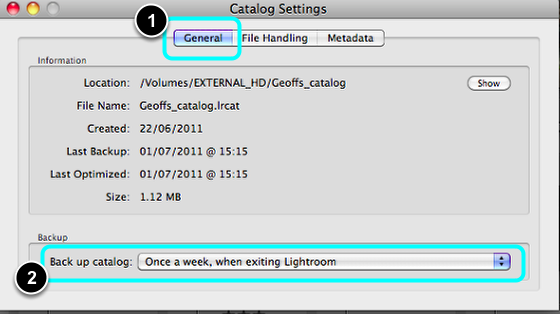
- Select General.
- Under Back up catalog: Select: Once a week, when exiting Lightroom.
Note, you can choose to back up daily if you prefer which would be preferable.
Exiting Lightroom
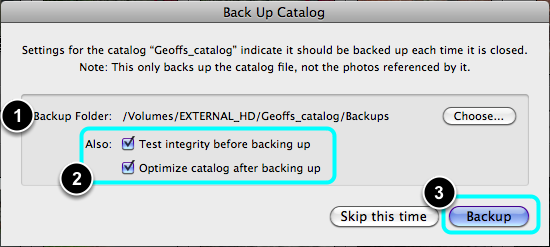
When exiting Lightroom the above panel will ask you to back up.
- Use the default Backup Folder, which will be beside your regular catalog. Normally there is no need to set or change this.
- Check both Tick Boxes.
- Select Backup.
Note, these setting should onlty need to once, after that Lightroom will ask you to backup when exiting.
Where are my Backups?
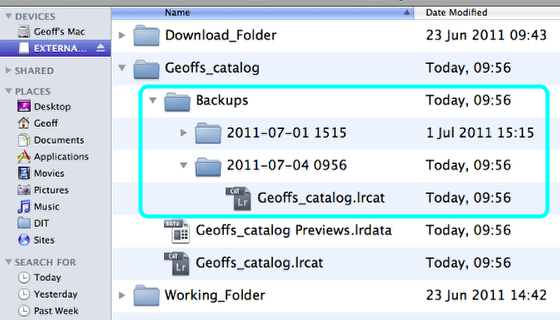
Backup catalogs can be found in your Catalog folder. Each Folder is dated according to when it was made.