Setting up File Naming template
Before importing for the first time you need to set up the File Naming template. This will apply the correct file naming convention to all imported image files.
All files should follow the format: yourname_YYYYMMDD_0001. Once this template is set up, it must be used for all file imports as part of the import procedure..
Import Photos . . .
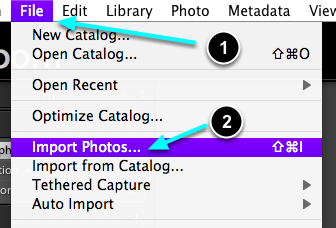
- Go File > Import Photos ...
- Or, press the Import ,,,, button (bottom left).
File Renaming
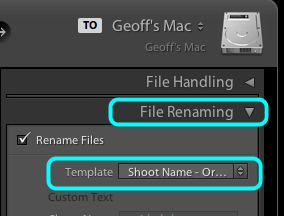
Open the File Naming panel on the righthand side.
Select Template.
Edit template
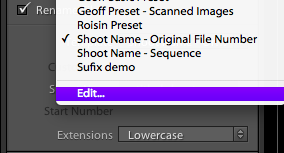
Select Edit ...
Template Editor
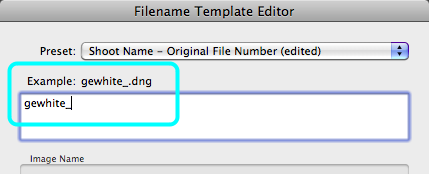
- Clear the text box,
- Enter your name using lowercase in the form: two initials followed by family name. Do not use any spaces or punctuation marks.
- Now enter an Underscore. Note example above the text box.
Add date information
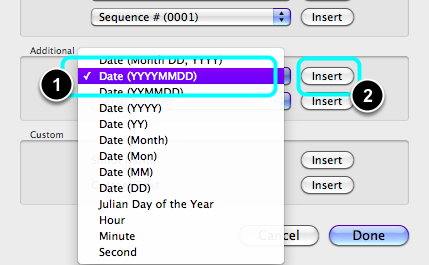
- Select from the drop down menu: Date (YYYYMMDD).
- Select Insert.
- Enter another Underscore.
Add the File Number
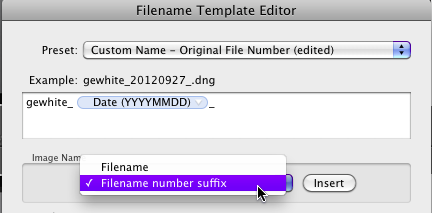
- Select: File Name Suffix
- Select Insert.
Save the preset
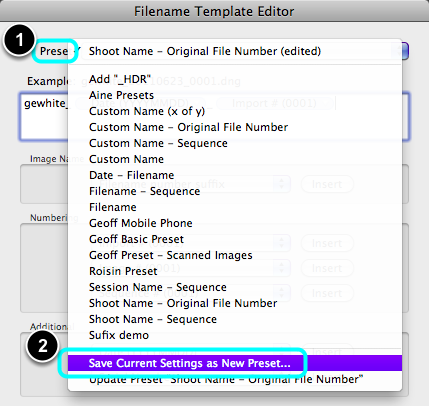
- Open the Preset drop down menu.
- Select Save Current Settings as New Preset ....
Name the preset
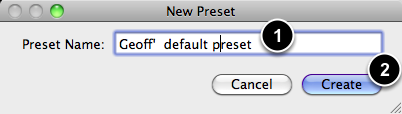
- Enter your name fo the Preset Name.
- Select Create.
Complete it

Select Done.